

Description
Your pool-room readings, within reach.
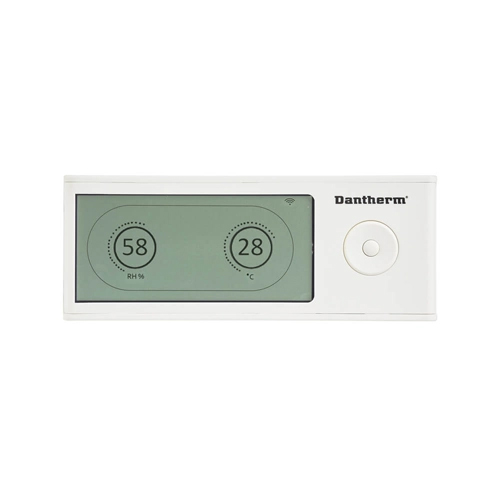
The DRC1 is a local wireless remote for compatible Dantherm CDP dehumidifiers. It shows the room’s humidity and temperature and lets you adjust the control settings from a convenient nearby position.
Status icons show what the system is doing. A button lock helps prevent accidental setting changes while the readings continue to update.

Choose the correct controller version
| This page covers | DRC1 button-operated wireless remote |
|---|---|
| Listed unit families | CDP 40 / 50 / 70; CDP 40T / 50T / 70T; CDF 40 / 50 / 70 |
| Before ordering | Check the dehumidifier model, serial plate and any existing controller |
| Heating adjustment | Only useful where suitable air-heating equipment is fitted |
Dantherm also lists a newer DRC2 touchscreen controller. Do not select a replacement by appearance alone; ask us to confirm the correct version for your unit.
How to use the DRC1 in four steps
-
Check the connection
Once paired, the radio symbol confirms the wireless connection. Humidity is shown as RH %; temperature is shown in °C. If it is not paired, use the pairing guide below.
-
Open the user menu
Hold the centre ENTER button for three seconds.
-
Choose and save a setting
Use UP/DOWN to move between icons. Use LEFT/RIGHT to change a value, then press ENTER to save it. Use the humidity icon for the moisture target and the heating icon for temperature, where heating is fitted.
-
Read the status or lock the buttons
The display shows operating and warning icons. To prevent setting changes, move the switch inside the battery compartment to LOCK; the display continues to update.
Set the humidity and temperature targets recommended for your pool room. The remote does not add heating, ventilation or other equipment to the dehumidifier.
Pairing it with the dehumidifier
Pairing means linking the remote to the unit it will control. Follow the DRC1 manual for your exact dehumidifier.
- Insert the batteries. The remote searches for a unit for two minutes and its display flashes. If it does not start searching, the manual describes holding LEFT for ten seconds.
- While it is searching, hold the dehumidifier’s UP and DOWN buttons together for five seconds.
- Look for the radio symbol on the remote and “Conn” on the dehumidifier to confirm the link.
If pairing fails or a warning remains, check the manual or send us the unit details and displayed message.
Useful details
| Wireless range | Up to 50 metres, depending on conditions—not a guaranteed distance through walls |
|---|---|
| Room readings | Relative humidity (RH %) and temperature (°C) |
| Displayed status | Dehumidifying, heating, extractor-fan activity and warnings, where applicable |
| Button lock | Prevents changes while the display keeps updating |
| Power options | Batteries; the manual also describes USB external power |
| What is separate | The dehumidifier and any optional heating equipment |
Two common questions
Do I need it for the dehumidifier to work?
No. The compatible CDP units have their own built-in humidity and temperature controls. This remote adds convenient access to those settings.
Is it a phone-app controller?
The DRC1 is a local wireless control panel. It is not presented as a Wi-Fi or smartphone-app accessory.
Keep the DRC1 guide to hand
Dantherm’s DRC1 manual includes the button layout, pairing instructions, setting changes and alarm information. The English instructions begin on page 4 of the PDF.


Reviews
There are no reviews yet.